 Skip to content

INTRODUCTION:
Shimmer is a dimension-expanding tool designed to enhance depth and spatial character in your mix.
Featuring four distinct modes, Shimmer uses a variety of techniques—from slow modulation to serial and parallel processing—to shape and extend the perceived space of your sound.
Each mode offers a unique approach to dimension enhancement, allowing you to dial in anything from subtle movement to rich, immersive depth.
Built as a add-on effect, Shimmer makes it easy to instantly elevate your mixes. With fifty presets, stereo control, volume shaping, and mix knob, you have everything you need to fine-tune the spatial representation of your mix.
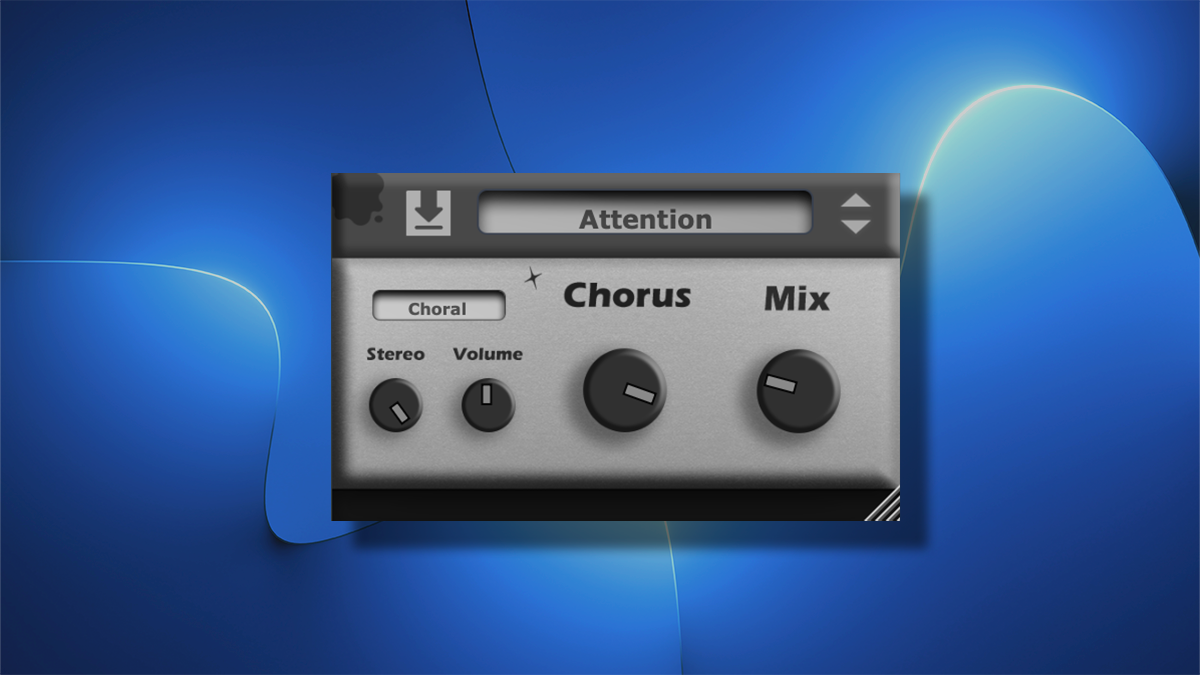
overview

Header
(0) Gooey Icon
Hover over this icon to display a tooltip showing the current product version.
(1) Preset Save Icon
Click to save the current preset. Presets are stored locally in the user’s file directory.
(2a) Preset Menu
Click to open the full list of saved presets.
Shortcut keys:
- Ctrl + Z → Undo
- Ctrl + Y → Redo
(2b) Preset Scroll Buttons
Use these buttons to scroll through available presets.
Main Controls
(3) Mix
Blends between the processed (dimension offset shimmer signal) and the dry signal.
(4) Main Control Modes
- Shimmer
Feeds back the signal at very short intervals with slight channel offsets, creating an interplay between a harmonic series and the original signal. - Reflective
Adjusts the depth of series and parallel reflections in Reflective mode, producing a structured spatial expansion. - Choral (Chorus Slider)
Adds slow, subtle modulation. Increasing the control introduces more noticeable modulation effects. - Swirl
Applies deeper and more pronounced modulation than Choral mode. At higher settings, this produces smooth, “silky” modulation in the mix.
(5) Volume
At the center position, there is no change in volume.
Adjusting left or right decreases or increases the level by up to ±12 dB.
(7) Stereo
At the center position, the stereo image is unchanged.
- Turn left → narrows toward mono
- Turn right → expands the stereo width
(8) Dimension Modes
- Shimmer
A stereo expansion mode with optional feedback, creating a subtle shimmering or “tinting”. - Reflective
A more traditional and subtle stereo expansion using series and parallel reflections.
Produces a cleaner, brighter signal with no modulation, though slight harmonic stacking may occur. - Choral
Uses very slow modulation, adding spatial movement without noticeable tonal coloration.
May slightly dampen high frequencies. - Swirl
Applies moderate but subtle modulation, creating a gentle chorusing effect.
Designed as an experimental dimension expander with its silky texture.
(9) Sparkle Button
Adds brightness and a slight increase in stereo width to the shimmer effect, enhancing clarity and presence.
Footer
(6) Footer Tooltips
Displays contextual help. For example, the Sparkle button tooltip explains that it adds brightness and width to the shimmer effect.
Instruction Manual – V2.0.0 – last updated 3/21/2026