 Skip to content

INTRODUCTION:
Black Rhino is a real-time beat masher from Gooey Audio that chops, rearranges, and loops one-, two-, or four-bar phrases to create fresh, evolving rhythms. Its internal engine synchronizes with your DAW’s tempo, keeping every rearrangement locked to the beat grid and perfectly in time.
Take your sound even further with dedicated Smoothing and Randomness controls. Smoothing softens harsh transients and helps eliminate unwanted pops and clicks, while Randomness introduces variation and unexpected twists, flipping and transforming your phrases into something entirely new.
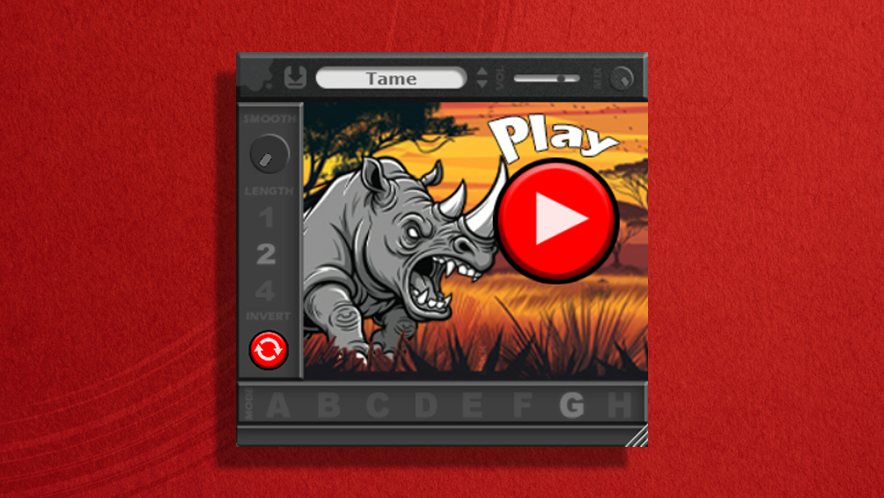
OVERVIEW

Header
(0) Gooey Icon
Hover over the Gooey icon to view the current plug-in version. Click the icon to bypass the plug-in, disabling audio processing while bypass is active.
(1) Preset Save Icon
Click the Save icon to save the current plug-in settings as a preset. Presets are stored locally in the user preset directory.
(2) Preset Menu
Click the preset menu to browse and load saved presets.
Keyboard Shortcuts
-
Ctrl + Z — Undo
-
Ctrl + Y — Redo
(3) Preset Scroll Buttons
Use the left and right arrow buttons to navigate between available presets.
(4) Input / Output Level Controls
Adjust the input level before processing, with up to +24 dB of gain or −60 dB of attenuation.
(5) Master Mix
Blend the processed signal with the original, unprocessed signal. Use the Master Mix control to create parallel-processing effects or fine-tune the balance between the original and processed audio.
Main Controls
(6) Play Button
Click to activate the beat-mashing effect. When enabled, the plug-in processes and rearranges the incoming audio according to the selected pattern and settings.
(7) Pattern
Select the pattern used to rearrange and play back the incoming audio. The Pattern control can also be automated in your DAW to introduce pattern changes during playback.
(8) Invert
Apply variation to the selected pattern by randomly choosing loops and reversing their playback direction. Use Invert to introduce unpredictable rhythmic changes and create more dynamic beat-mashing effects.
(9) Length
Set the active pattern length to one, two, or four bars.
The plug-in includes 32 unique patterns, giving you a variety of rhythmic arrangements to explore.
(10) Smooth
Soften transitions between rearranged audio clips to reduce clicks, pops, and other unwanted artifacts. Increase the Smooth setting when transitions sound abrupt or produce unwanted noise.
Instruction Manual – V1.0.0 – last updated 10/30/2026