 Skip to content

INTRODUCTION:
White Rhino is a beat masher.
You must purchase this product before it goes extinct. It will be on sale from 09/11/2026 to 09/25/2026. It is going to be big, and it is going to get hard.
We are offering this exclusive deal for only $4.99, but after the sale is done this plug-in is not going to be for sale.

OVERVIEW
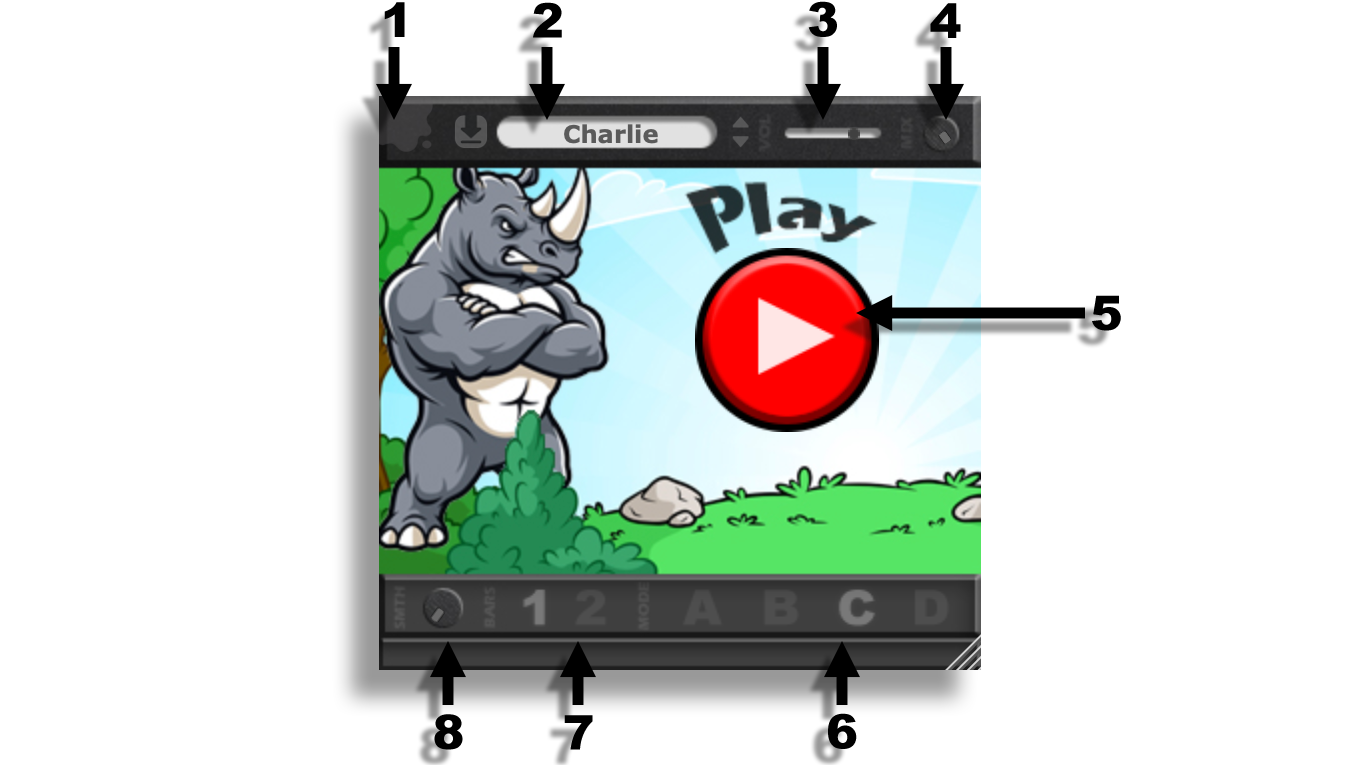
Header
(0) Gooey Icon
Hover over the Gooey icon to display a tooltip showing the current plug-in version. Click the icon to bypass the plug-in. When bypassed, the plug-in will no longer process the input signal.
(1) Preset Save Icon
Click the Save icon to save the current plug-in settings as a preset. Presets are stored locally in the user preset directory.
(2a) Preset Menu
Click the preset menu to open and select from the available saved presets.
Keyboard Shortcuts:
-
Ctrl + Z → Undo
-
Ctrl + Y → Redo
(2b) Preset Scroll Buttons
Use the left and right scroll buttons to navigate through the available presets.
(3) Input / Output Level Controls
The Input control adjusts the pre-processing level, providing up to +24 dB of gain or up to -60 dB of attenuation.
The Output control adjusts the post-processing level, providing up to +24 dB of gain or up to -60 dB of attenuation.
(4) Master Mix
The Master Mix control blends the processed signal with the original input signal. Use this control to create parallel-processing effects or to dial in the desired amount of processing.
Main Controls
(5) Play Button
When enabled, the plug-in begins processing and mashing the incoming audio signal according to the selected settings.
(6) Pattern
Selects the pattern used to rearrange and playback the input material. The Pattern control can also be automated from your DAW to create pattern changes during playback.
(7) Length
Sets the length of the active pattern to either one bar or two bars.
The plug-in includes eight unique patterns to choose from.
(8) Smooth
The Smooth control softens transitions between rearranged clips to reduce clicks, pops, and other unwanted artifacts. Increase the setting when processing produces rough or abrupt clip transitions.
Instruction Manual – V1.0.0 – last updated 8/22/2026